Redhat OpenShift 280
DO280 | EX280
- 10 Chapters
- Redhat Ebook
- Redhat Exam
Red Hat OpenShift Administration II: Configuring a Production Cluster
Configure and manage OpenShift clusters to maintain security and reliability across multiple applications and development teams.
Red Hat OpenShift Administration II: Configuring a Production Cluster (DO280) prepares OpenShift Cluster Administrators to perform daily administration tasks on clusters that host applications provided by internal teams and external vendors, enable self-service for cluster users with different roles, and deploy applications that require special permissions such as such as CI/CD tooling, performance monitoring, and security scanners. This course focuses on configuring multi-tenancy and security features of OpenShift as well as managing OpenShift add-ons based on operators.
The skills you learn in this course can be applied using all versions of OpenShift, including Red Hat OpenShift on AWS (ROSA), Azure Red Hat OpenShift, and OpenShift Container Platform.
This course is based on OpenShift Container Platform 4.18.
Course Content Summary
- Deploying packaged applications using manifests, templates, kustomize, and helm.
- Configuring authentication and authorization for users and applications.
- Protecting network traffic with network policies and exposing applications with proper network access.
- Deploying and managing applications using resources manifests.
- Enabling developer self-service of application projects.
- Managing OpenShift cluster updates and Kubernetes operator updates.
Target Audience
- Platform Administrators, System Administrators, Cloud Administrators, and other infrastructure-related IT roles who are responsible for managing and maintaining infrastructure for applications
- Enterprise Architects, Site Reliability Engineers, DevOps Engineers, and other application-related IT roles who are responsible for designing infrastructure for applications
- Declarative Resource Management
- Deploy and update applications from resource manifests that are parameterized for different target environments.
- Deploy Packaged Applications
- Deploy and update applications from resource manifests that are packaged for sharing and distribution.
- Authentication and Authorization
- Configure authentication with the HTPasswd identity provider and assign roles to users and groups.
- Network Security
- Protect network traffic between applications inside and outside the cluster.
- Expose non-HTTP/SNI Applications
- Expose applications to external access without using an Ingress controller.
- Enable Developer Self-Service
- Configure clusters for safe self-service by developers from multiple teams and disallow self-service if projects have to be provisioned by the operations staff.
- Manage Kubernetes Operators
- Install and update Operators that are managed by the Operator Lifecycle Manager and by the Cluster Version Operator.
- Application Security
- Run applications that require elevated or special privileges from the host Operating System or Kubernetes.
- OpenShift Updates
- Update an OpenShift cluster and minimize disruption to deployed applications.
Impact on the Organization
- This course is intended to develop the skills needed to manage Red Hat OpenShift clusters and support containerized applications that are highly available, resilient, and scalable. Red Hat OpenShift is an enterprise-hardened application platform based on Kubernetes that provides a common set of APIs and abstractions that enable application portability across cloud providers and traditional data centers. Red Hat OpenShift adds consistency and portability of operational processes across these environments and can also be deployed as a managed service. A Red Hat SRE team shares the responsibility of managing Red Hat OpenShift clusters with a customer’s IT operations team when using a managed OpenShift offering such as Red Hat OpenShift on AWS (ROSA) or Azure Red Hat OpenShift (ARO).
Impact on the Individual
- As a result of attending this course, students will be able to perform the set of tasks that OpenShift cluster administrators are expected to perform in their daily jobs for on-premises, cloud-based, and vendor-managed clusters, including enabling add-on operators. Students will also be able manage multi-tenant permissions for different roles and configure applications that require privileged access to cluster and host resources.
Recommended next course or exam
- Red Hat Certified OpenShift Administrator exam (EX280)
- Red Hat OpenShift Administration III: Scaling Kubernetes Deployments in the Enterprise (DO380)
- Red Hat Certified Specialist in OpenShift Automation and Integration exam (EX380)
Study points for the exam
As with all Red Hat performance-based exams, configurations must persist after reboot without intervention.
- Manage OpenShift Container Platform
- Use the web console to manage and configure an OpenShift cluster
- Use the command-line interface to manage and configure an OpenShift cluster
- Create and delete projects
- Locate and examine container images
- Identify images using tags and digests
- Query, format, and filter attributes of Kubernetes resources
- Import, export, and configure Kubernetes resources
- Examine resources and cluster status
- Monitor cluster events and alerts
- View logs
- Assess the health of an OpenShift cluster
- Troubleshoot common container, pod, and cluster events and alerts
- Use product documentation
- Be prepared to perform all tasks of a Red Hat Certified Technologist in OpenShift
- Work with resource manifests
- Deploy applications from YAML resource manifests
- Update application deployments
- Deploy applications using Kustomize
- Work with Kustomize overlays
- Create and use secrets
- Create and use configuration maps
- Deploy applications
- Deploy applications from templates and Helm charts
- Manage application deployments
- Work with replica sets
- Work with labels and selectors
- Configure services
- Expose applications to external access
- Manage authentication and authorization
- Configure the HTPasswd identity provider for authentication
- Create and delete users
- Modify user passwords
- Create and manage groups
- Modify user and group permissions
- Configure network security
- Configure networking components
- Troubleshoot software defined networking
- Create and edit external routes
- Control cluster network ingress
- Secure external and internal traffic using TLS certificates
- Configure application network policies
- Expose non-HTTP/SNI Applications
- Configure a load balancer service
- Configure external application access
- Enable developer self-service
- Configure cluster resource quotas
- Configure project quotas
- Configure project resource requirements
- Configure project limit ranges
- Configure project templates
- Manage OpenShift operators
- Install an operator
- Uninstall an operator
- Delete an operator
- Configure application security
- Configure and manage service accounts
- Run privileged applications
- Manage and apply permissions using security context constraints
- Create and apply secrets to manage sensitive information
- Configure application access to Kubernetes APIs
- Deploy jobs to perform one-time tasks
- Configure Kubernetes cron jobs
Other Redhat Courses
Master Red Hat Linux, Ansible Automation, OpenShift, OpenShift AI, Virtualization, and Enterprise Kubernetes.
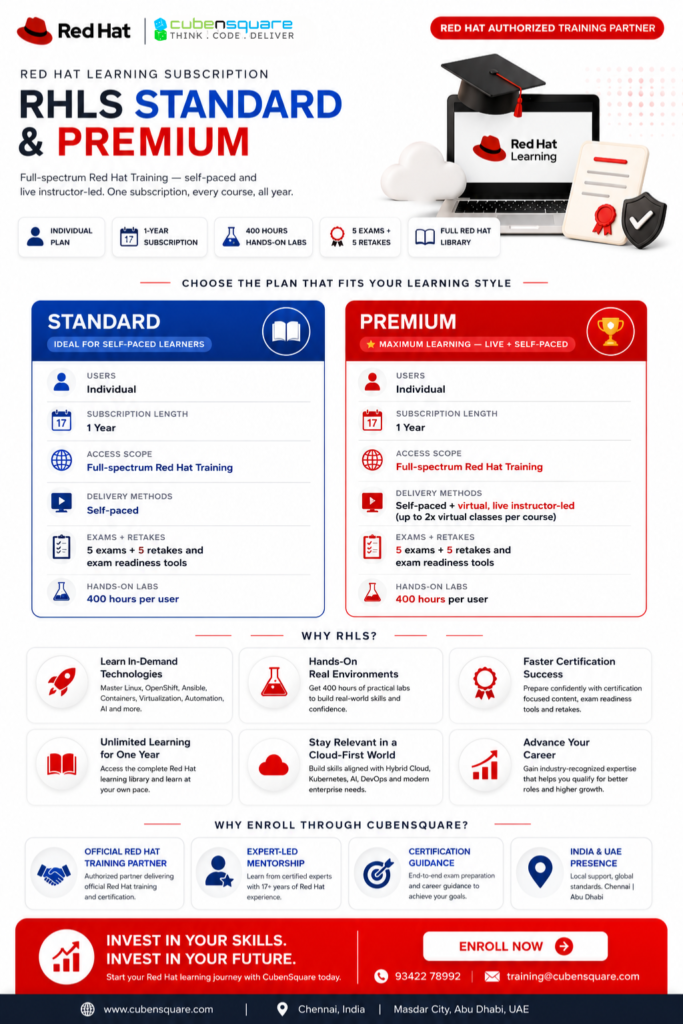
Redhat Learning Subscription
Comprehensive training and learning pathways on Red Hat products, industry-recognized certifications, and a flexible and dynamic IT learning experience.