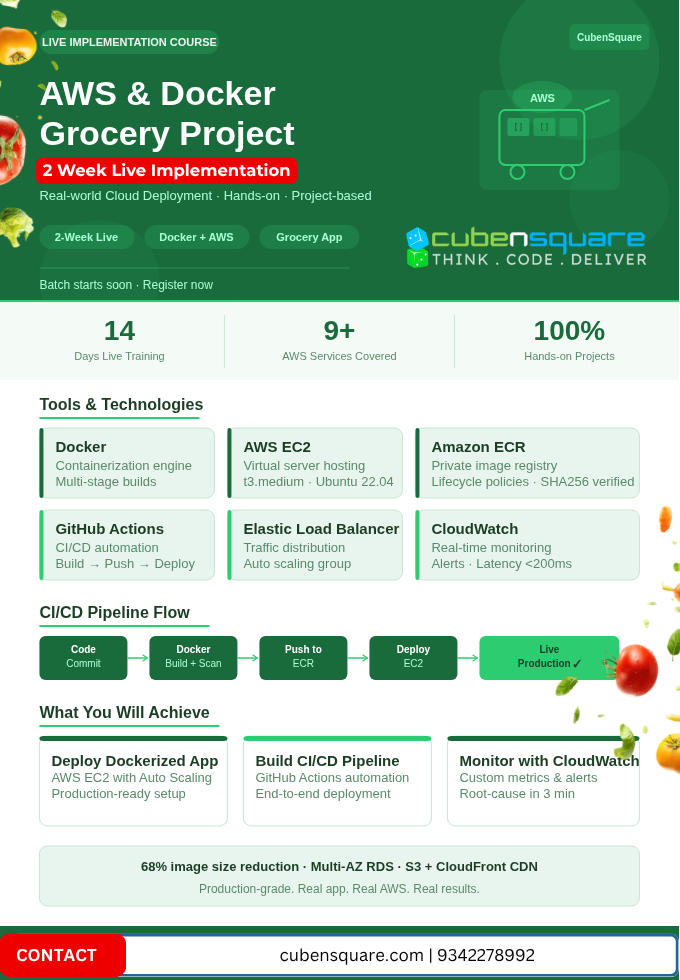
AWS & Docker Grocery Project
Real Time Installation - 10 Days
CubenSquare Customized Workshop
2-Week Live Implementation: Real-World Cloud Deployment
A 2-week, hands-on live program where you deploy a real Grocery App (v2.1) on AWS using Docker. You start with container creation and finish with a production go-live, covering CI/CD, load balancing, auto scaling, SSL, monitoring, and a managed database.
This is a project-based course. You build the full production setup yourself, step by step, with live guidance, and gain real infrastructure experience and proven workflows.
Tools & Technologies: Docker, AWS EC2, Amazon ECR, IAM, Elastic Load Balancer, CloudWatch, Linux Ubuntu 22.04, GitHub Actions, AWS CLI, Trivy
AWS Managed Services: Route 53, AWS Certificate Manager (ACM), Amazon RDS (MySQL 8.0), Amazon S3 + CloudFront
Week 1: Containerization
Days 1–7 | Docker Setup, App Packaging & Local Validation
Docker Setup & Containerization
- Write a Dockerfile (base image, dependencies, runtime environment)
- Build the image with
docker build - Run and test the container locally
- Optimize with multi-stage builds, achieving a 68% image size reduction for faster deployments
- Scan images for vulnerabilities with Trivy
EC2 Instance Setup
- Launch a t3.medium instance in us-east-1 running Ubuntu 22.04 LTS
- Configure Security Groups with strict inbound rules (ports 80/443/22)
- Attach an IAM instance role with least-privilege policies for ECR and CloudWatch
- Use a User Data script to install Docker and start the service on boot
Amazon ECR Push
- Create a private ECR repository
- Set a lifecycle policy to retain only the last 10 images
- Authenticate the Docker client using AWS CLI credentials
- Tag and push the grocery app image, then verify the SHA256 digest
Week 2: Cloud Deployment
Days 8–14 | ECR Integration, EC2 Deploy & Production Observability
CI/CD Pipeline with GitHub Actions
- Code commit → CI trigger → Docker build + Trivy scan → push to Amazon ECR → deploy to AWS EC2 → ELB health check → live in production
- Full automation from code push to live production
Elastic Load Balancer + Auto Scaling
- Distribute traffic across multiple EC2 instances running the Docker app
- Route traffic only to healthy containers using ELB health checks
- Configure Auto Scaling rules that adjust capacity based on CPU and request load
Monitoring with CloudWatch
- Build real-time dashboards for CPU utilization, HTTP error rate, container uptime, and app latency
- Set alarms for CPU and latency
- Use custom metrics to reach root-cause analysis in under 3 minutes
Production-Grade Enhancements
- Route 53: domain setup with latency-based routing
- ACM SSL: automatic certificate provisioning and renewal for HTTPS
- RDS MySQL 8.0: Multi-AZ deployment, encrypted at rest, automated snapshot backups
- Amazon S3 + CloudFront: static asset delivery through an OAI-protected CDN
Final Architecture (End-to-End)
Developer → GitHub → GitHub Actions → Docker Build → Amazon ECR → EC2 Auto Scaling → ELB → Route 53 → End Users, with Amazon RDS (database) and Amazon S3 + CloudFront (static assets).
By the end of this course, you will be able to:
- Deploy a production Dockerized app on AWS EC2, with resilient, scalable compute behind an Elastic Load Balancer using health checks and Auto Scaling
- Build an end-to-end CI/CD pipeline with GitHub Actions that automates code build, Trivy vulnerability scanning, push to Amazon ECR, and safe deployment to EC2
- Monitor and debug with CloudWatch, tracking SLOs, setting alarms for CPU and latency, and troubleshooting quickly with real-time observability
- Optimize Docker images with multi-stage builds for faster ECR pushes and deployments
- Secure your infrastructure with least-privilege IAM roles, strict security groups, and SSL/TLS via ACM
- Design a production-ready architecture that separates S3, RDS, and EC2 so each can scale independently
Key Lessons from the Real Time 2-Week Deployment
- Docker multi-stage builds cut image size by 68%
- EC2 launch type gave full control for container debugging
- ELB health checks prevented all traffic to unhealthy containers
- CloudWatch custom metrics enabled root-cause analysis in under 3 minutes
- Separation of concerns (S3 + RDS + EC2) enabled independent scaling